Mga Kaso ng iPad Pro/Air
 Mga Kaso ng Galaxy Tab
 Magnetik na Keyboard para sa iPad
 Mga Case ng Xiaomi Pad
 Mga Kagamitan sa Tablet
 iPhone 18 Series
 iPhone 17 Series
 iPhone 16 Series
 iPhone 15 Series
 iPhone 14 Series
 iPhone 13 Series
 Galaxy Z Fold at Flip Series
 Galaxy S26 Series
 Galaxy S25 Series
 Galaxy S24 Series
 Galaxy S23 Series
 Google Pixel 11 Series
 Google Pixel 10 Series
 Google Pixel 9 Series
 Xiaomi Serye
 OnePlus Serye
 Oppo Serye
 Vivo Serye
 Huawei Honor Series
 Walang Anumang Serye
 Serye ng iPhone
 Samsung Galaxy Series
 Google Series
 Xiaomi Series
 Serye ng OPPO
 Natatabing Keyboard
 Mga Tagapagsalita
 Laptop
 Kalusugan
 Magnetic Wallet Stand
 RayDock Charging Dock
 Mga Charger at Kable
 Mga Suporta at Mount ng Telepono
 Pagsingil ng Sasakyan
 Summer Sale ☀️
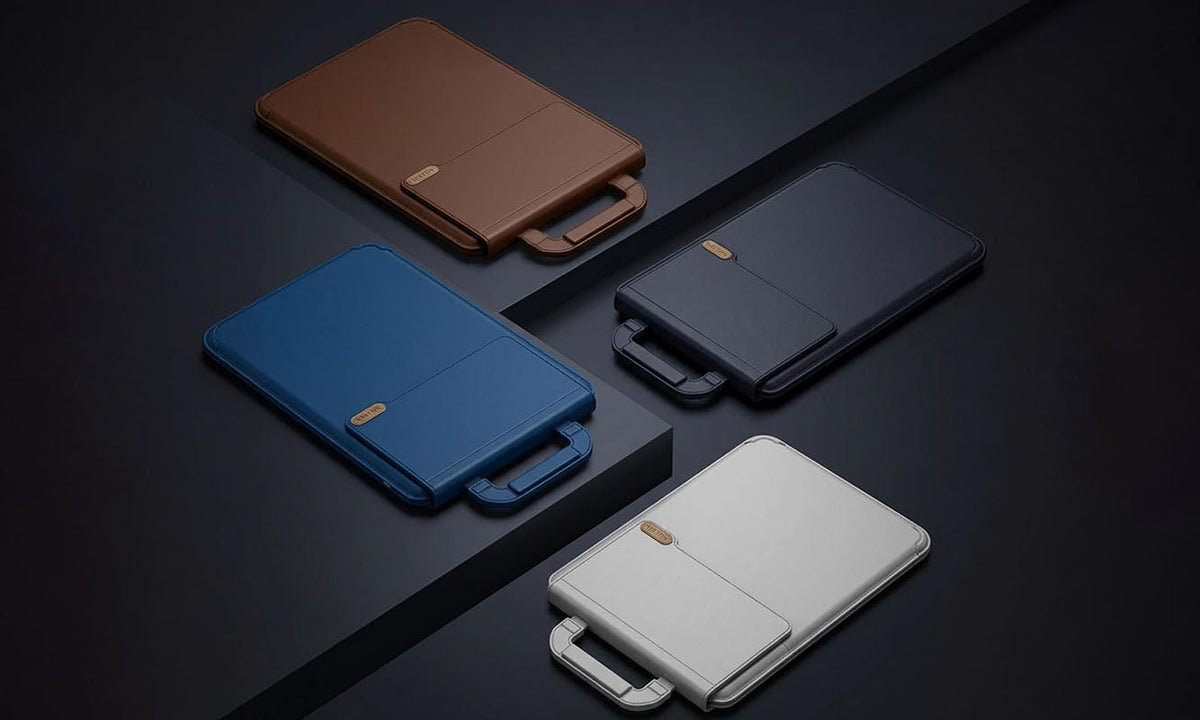
Looking for a new laptop sleeve for work, study, or travel?
Start with the basics: the right size, enough protection, and a weight you're comfortable carrying.
But if your laptop moves with you every day, we'd look at one more thing:
What can the sleeve do after you take your laptop out?
Traditional Laptop Sleeve vs. Multi-Functional Laptop Sleeve
| What Matters | Traditional Laptop Sleeve | NILLKIN Versatile Pro |
|---|---|---|
| Laptop protection | ✓ | ✓ |
| Easy to carry | ✓ | ✓ |
| Built-in laptop stand | Usually not | ✓ |
| Adjustable angles | Usually not | 15° / 25° |
| Mouse pad | Separate accessory | Built in |
| After the laptop comes out | Usually put aside | Becomes part of your setup |
| What you may carry | Sleeve + stand + mouse pad | One integrated setup |
| Best suited for | Simple everyday carrying | Work, study & travel |
If all you need is protection, a traditional sleeve may be enough. But if you regularly work or study in different places, a multifunctional sleeve can replace a few things you'd otherwise carry separately.
A Laptop Sleeve That Becomes Part of Your Setup
Laptop. Sleeve. Stand. Mouse pad.
That's usually four separate parts of a portable setup.
The NILLKIN Versatile Pro Laptop Sleeve with Stand & Mouse Pad combines three of them into one: sleeve + stand + mouse pad.
While you're moving, it protects and carries your laptop. Once you sit down, the same sleeve becomes part of your workspace.
That makes more sense for people who move between the office, classroom, library, café, airport, or hotel and don't want to pack a separate stand and mouse pad every time.

Two Angles for Different Places
Your desk won't always be the same height — especially if you're working somewhere new.
The built-in stand offers 15° and 25° positions, giving you two ways to adjust your laptop depending on the table, seat, and how you're working.
A raised angle can also make longer laptop sessions feel more comfortable than working flat on a low table.

One Less Thing to Pack: Your Mouse Pad
Not every table works well with a mouse.
Cafés, hotels, shared workspaces, and even some library desks can have glossy or uneven surfaces that aren't ideal for everyday use.
Versatile Pro opens into a mouse pad, so you have a consistent surface without adding another accessory to your bag.
It's a small feature, but one you'll probably appreciate more when you're working away from your usual desk.
Multi-Functional, But Still Made to Travel
More functions don't have to mean a bulky laptop sleeve.
Versatile Pro weighs approximately 428g for the 14.2-inch version and 524g for the 16.2-inch version, making it practical for daily commuting, study, and travel.
The idea isn't to carry more features.
It's to carry fewer separate things.
Which Type of Laptop Sleeve Is Right for You?
| Your Routine | What We'd Choose |
|---|---|
| Laptop mostly stays at home | Basic protective sleeve |
| Home ↔ fixed office | Lightweight traditional sleeve |
| Classroom ↔ library ↔ dorm | Multi-functional sleeve |
| Hybrid / remote work | Multi-functional sleeve |
| Frequent travel | Multi-functional sleeve |
| Already carry a stand & mouse pad you like | Either works — choose based on preference |
If your laptop mainly travels between two fixed desks, a simple sleeve may be all you need.
But if your workspace changes throughout the week, getting more use from the sleeve you're already carrying can make your setup noticeably simpler.
Frequently Asked Questions
What size laptop sleeve should I buy?
Check your laptop's actual length, width, and thickness rather than relying only on the advertised screen size. Two laptops with the same screen size can still have different body dimensions.
For the NILLKIN Versatile Pro, you can choose between two sizes:
- 14.2-inch version: compatible with laptops up to 355 × 259 × 20 mm (L × W × H)
- 16.2-inch version: compatible with laptops up to 383 × 289 × 22 mm (L × W × H)
If you're unsure which size to choose, measure your laptop and compare its dimensions with the maximum compatible size above before ordering.
Should a laptop sleeve fit tightly?
A laptop sleeve should fit securely without making the laptop difficult to insert or remove. A little movement is normal, but too much empty space may allow the laptop to shift around inside.
How much protection does a laptop sleeve need?
It depends on how you carry your laptop. If it mostly stays inside another bag, basic scratch and bump protection may be enough. For daily commuting or travel, look for better edge, corner, and overall structural protection without adding unnecessary bulk.
Is a laptop sleeve with a stand worth it?
Yes, especially if you spend long hours working or studying on your laptop. The real benefit of a built-in stand is the ability to adjust your laptop to a more comfortable working angle instead of keeping it flat on the desk.
The NILLKIN Versatile Pro offers 15° and 25° adjustable angles, so you can switch between positions depending on your desk height, seating position, and how you use your laptop. It's a simple way to create a more ergonomic and comfortable setup wherever you work or study.
Can a laptop sleeve be used as a mouse pad?
Some multifunctional laptop sleeves can. The NILLKIN Versatile Pro is designed to open into a mouse pad while also supporting the laptop on its built-in stand.
Is a multifunctional laptop sleeve good for travel?
It can be especially useful for travel if you regularly work from hotels, airports, cafés, or shared workspaces. Combining a sleeve, stand, and mouse pad can reduce the number of separate accessories you need to pack.
Carry Less. Set Up Faster.
If your laptop goes wherever you do, your sleeve can do more than simply protect it between destinations.
The NILLKIN Versatile Pro Laptop Sleeve with Stand & Mouse Pad combines everyday laptop protection, a two-angle stand, and a mouse pad in one portable setup.
Less to carry. More use from what you already bring.